¶ Lenovo Y1 / Y1S
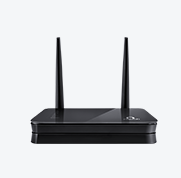
Through a startup named xCloud, Lenovo entered wireless router market. Their first product is marketed as Newifi Mini. But its name on tag declares as Lenovo Y1. It's a small sized router with 802.11N + 802.11AC wireless connection. It contains 2 100M LAN and 1 100M WAN.
FIXME
¶ Getting started with a new Device Page
- This is an empty template that suggests the information that should be present on a well-constructed Device Page. This means, that you have to fill it with life and information.
- There are several "fixme" tags with text on a light background (like this text) throughout this template. As you fill in the page, remove those tags so that people can judge its completeness.
- When there are no more "fixme" tags left, delete this one too, along with the
<WRAP>that encloses it.¶ Keep the articles modular
- Please include only model specific information, omit bla,bla and put everything generic into separate articles
- If you have no time to write certain stuff, link to start
- start should lead the way, do not explain this again
- DO NOT provide a complete howto here! Instead groom the general documentation.
¶ Supported Versions
<!-- ToH: {
"source": "json",
"dom": "t",
"paging": false,
"rotate": true,
"shownColumns": ["brand", "model", "version", "supportedcurrentrel", "oemdevicehomepageurl", "owrt_forum_topic_url", "deviceid"],
"filterColumns": {"brand": "^Lenovo$", "model": "Y1"}
} -->
¶ Hardware Highlights
<!-- ToH: {
"source": "json",
"dom": "t",
"paging": false,
"rotate": true,
"shownColumns": ["model", "version", "cpu", "cpumhz", "flashmb", "rammb", "wlanhardware", "wlan24ghz", "wlan50ghz", "ethernet100mports", "ethernet1gports", "modem", "usbports"],
"filterColumns": {"brand": "^Lenovo$", "model": "Y1"}
} -->
¶ Installation
<!-- ToH: {
"source": "json",
"dom": "t",
"paging": false,
"rotate": true,
"shownColumns": ["model", "version", "supportedcurrentrel", "firmwareopenwrtinstallurl", "firmwareopenwrtupgradeurl", "firmwareoemstockurl"],
"filterColumns": {"brand": "^Lenovo$", "model": "Y1"}
} -->
¶ Flash Layout
Output of /proc/mtd
Will translate to tablet later with booting info later.
dev:    size   erasesize  name
mtd0: 00030000 00010000 "u-boot"
mtd1: 00010000 00010000 "u-boot-env"
mtd2: 00010000 00010000 "factory"
mtd3: 00fb0000 00010000 "firmware"
mtd4: 0010c943 00010000 "kernel"
mtd5: 00ea36bd 00010000 "rootfs"
mtd6: 00c80000 00010000 "rootfs_data"
¶ OEM easy installation
Unlike many other wireless router with same SoC selling in China, this one doesn't have U-boot locked. Thus installing OpenWrt becomes much easier comparing to other competitors.
We will utilize the U-boot recovery mode to flash the OpenWrt.
- Restore the route to factory default unless it's a brand-new opened box.
- Disconnect the power cable.
- Connect the route to a laptop/desktop with a ethernet cable on LAN port.
- Set IP address on the laptop /desktop to 192.168.1.11 with Netmask as 255.255.255.0, Gateway as 192.168.1.1
- Insert the power cable and QUICKLY press the RESET button in rear panel.
- If previous step was done properly, two LEDs on the routing will be blinking. That's a sign for recovery mode.
- Type 192.168.1.1 in the Web browser address bar.
- On recovery Web page, select the downloaded OpenWrt bin file.
- Click flash and wait.
- Meanwhile, you may want to restore the IP settings on laptop/desktop to Automatic(DHCP)
NOTE: The similar procedure may be used to restore to stock firmware.
¶ OEM installation using the TFTP method
Flashing through TFTP doesn't seem to work right now.
¶ Upgrading OpenWrt
¶ Debricking
¶ Failsafe mode
¶ Basic configuration
-> Basic configuration After flashing, proceed with this.
¶ 5G Network
The 802.11AC, or 5G wireless capability is provided kmod-mt76 package. It may be installed via terminal
<code> opkg update && opkg -y install kmod-mt76</code>
Or through LuCI Software page.
After rebooting, the LuCi will present the 5G network in Wifi page.
¶ Specific Configuration
FIXME Please fill in real values for this device, then remove the EXAMPLEs
¶ Network interfaces
The default network configuration is:
Interface Name Description Default configuration br-lan EXAMPLE LAN & WiFi EXAMPLE 192.168.1.1/24 vlan0 (eth0.0) EXAMPLE LAN ports (1 to 4) EXAMPLE None vlan1 (eth0.1) EXAMPLE WAN port EXAMPLE DHCP wl0 EXAMPLE WiFi EXAMPLE Disabled
¶ Switch Ports (for VLANs)
FIXME Please fill in real values for this device, then remove the EXAMPLEs
Numbers 0-3 are Ports 1-4 as labeled on the unit, number 4 is the Internet (WAN) on the unit, 5 is the internal connection to the router itself. Don't be fooled: Port 1 on the unit is number 3 when configuring VLANs. vlan0 = eth0.0, vlan1 = eth0.1 and so on.
Port Switch port Internet (WAN) EXAMPLE 4 LAN 1 EXAMPLE 3 LAN 2 EXAMPLE 2 LAN 3 EXAMPLE 1 LAN 4 EXAMPLE 0
¶ Buttons
-> hardware.button on howto use and configure the hardware button(s). Here, we merely name the buttons, so we can use them in the above Howto.
FIXME Please fill in real values for this device, then remove the EXAMPLEs
The Lenovo Y1 has the following buttons:
BUTTON Event EXAMPLE Reset reset EXAMPLE Secure Easy Setup ses EXAMPLE No buttons at all. -
¶ Hardware
¶ Info
<!-- ToH: {
"source": "json",
"dom": "t",
"paging": false,
"rotate": true,
"shownColumns": ["brand", "model", "version", "devicetype", "availability", "supportedsincecommit", "supportedcurrentrel", "bootloader", "target", "cpumhz", "flashmb", "rammb", "switch", "ethernet100mports", "ethernet1gports", "commentsnetworkports", "modem", "vlan", "wlan24ghz", "wlan50ghz", "wlancomments", "detachableantennas", "usbports", "sataports", "commentsusbsataports", "serial", "jtag", "ledcount", "buttoncount", "deviceid", "owrt_forum_topic_url", "wikideviurl", "oemdevicehomepageurl", "firmwareoemstockurl", "firmwareopenwrtinstallurl", "firmwareopenwrtupgradeurl", "comments"],
"filterColumns": {"brand": "^Lenovo$", "model": "Y1"}
} -->
¶ Photos
/* =====>>>>> Standard size for photos: add ?400 to the medialink */ /* When uploading photos, name them intelligently. Nobody knows what 20100930_000602.jpg is! */ /* e.g.  */ /* Thanks, your wiki administration - Oct. 2015 */
Front:
Insert photo of front of the casing
Back:
Insert photo of back of the casing
Backside label:
Insert photo of backside label
¶ Opening the case
-> Warranty
http://wikidrv.cn/uploadfile/2015/0803/20150803104407465.jpg FIXME DEAD LINK
http://wikidrv.cn/uploadfile/2015/0803/20150803104407917.jpg FIXME DEAD LINK
Main PCB:
http://wikidrv.cn/uploadfile/2015/0803/20150803104409339.jpg FIXME DEAD LINK
http://wikidrv.cn/uploadfile/2015/0803/20150803104410932.jpg FIXME DEAD LINK
http://wikidrv.cn/uploadfile/2015/0803/20150803104409395.jpg FIXME DEAD LINK
http://wikidrv.cn/uploadfile/2015/0803/20150803104409529.jpg FIXME DEAD LINK
http://wikidrv.cn/uploadfile/2015/0803/20150803104409949.jpg FIXME DEAD LINK
http://wikidrv.cn/uploadfile/2015/0803/20150803104410474.jpg FIXME DEAD LINK
==== Serial ==== -> port.serial general information about the serial port, serial port cable, etc.


How to connect to the Serial Port of this specific device:
http://www.newbandeng.com/data/attachment/forum/201502/22/132451bmddic5fdockdhfi.jpg FIXME DEAD LINK

| Serial connection parameters for Lenovo Y1 v1 |
115200, 8N1 |
|---|
¶ JTAG
-> port.jtag general information about the JTAG port, JTAG cable, etc.
How to connect to the JTAG Port of this specific device:
Insert photo of PCB with markings for JTAG port
¶ Bootlogs
¶ OEM bootlog
COPY HERE THE BOOTLOG WITH THE ORIGINAL FIRMWARE
¶ OpenWrt bootlog
COPY HERE THE BOOTLOG ONCE OPENWRT IS INSTALLED AND RUNNING
¶ Notes
Space for additional notes, links to forum threads or other resources.
- ...
¶ Tags
How to add tags 