¶ CFE
- [Common Firmware Environment](https://en.wikipedia.org/wiki/Common Firmware Environment)
- http://www.linux-mips.org/wiki/Common_Firmware_Environment (registration dead)
- Broadcom CFE sources for some test boards
- README-1.4.2.txt (readme)
- cfe-1.4.2-src.tar.bz2
1.9M(source) - samplesw-1.3.tar.bz2
0.3M(examples in C and MIPS64 assembly) - broadcom_2006a_410_RELEASE-NOTES.txt (tool readme)
- broadcom_2006a_410.src.tar.bz2
69.2M(tool source) - AsusWRT RT-AX88U router GPL source code (Contains a CFE source-code that supports
63268|6838|63138|63381|63148|6848|4908|6858|47189|63158|6846|6856, compiling instruction available)
¶ Using the CFE
BCM63XX/BCM68XX NAND Flash Support
¶ bcm47xx CFE
CFE on bcm47xx devices allows running/installing firmware using a lot of different methods. Usually only few of them are available, depending on the choice of manufacturer who compiled and installed CFE. Most of the methods require access to the CFE console which means you need to attach a serial console. To get a prompt just keep CTRL+C pressed (or ESC for some models) while powering the device up.
Below is the (hopefully) completed list of methods. The best idea is to find a one looking the best/easiest and check if it works on your device.
¶ Using auto-starting CFE TFTP server
Some CFEs start TFTP server for few seconds right after hardware initialization. This is probably the only method of installing firmware with CFE that doesn't require serial console. You simply have to give CFE 1-3 seconds to initialize the switch and then set your IP and start sending the firmware. If you have a serial console, you can identify TFTP server running with the following messages:
_tftpd_open(): retries=0/3
_tftpd_open(): retries=1/3
_tftpd_open(): retries=2/3
Unfortunately even if this method is available for you, it may not work. For example on Linksys E900 it fails after uploading firmware with the:
CMD: [boot -raw -z -addr=0x80001000 -max=0x1851e50 -fs=memory :0x807ae1b0]
Loader:raw Filesys:memory Dev:eth0 File::0x807ae1b0 Options:(null)
Loading: PANIC: out of memory!
Please note that CFE may require a device specific firmware image (with a special header), otherwise (when using a generic .trx) it may fail with the:
CMD: [flash -ctheader -mem -size=0x4c1000 0x807ae1b0 flash1.trx]
Reading from 0x807ae1b0: CODE Pattern is incorrect! (E900)
The file transferred is not a valid firmware image.
¶ Using CFE TFTP manually
CFE almost always contains flash command that may behave like both: TFTP client and server. The generic usage is following:
flash [options] source-file [destination-device]
This is very important to pass [destination-device] argument or CFE will write to the flash0 device overwriting the CFE! To see a list of available devices try show devices command.
Regarding [options] there is one important one called -noheader and if you happen to be Linksys owner, there is also -ctheader:
-noheader    Override header verification, flash binary without checking
-ctheader    Check header of CyberTAN
By default CFE validates received firmwares checking if they contain a device-specific header. That won't allow installing firmware created for a different device. If you want to install trx firmware directly (image without an extra device-specific header), you may use -noheader option.
¶ TFTP client
In this scenario we will tell CFE to connect to the remote TFTP server, download firmware and install it on the flash. This means that source-file should be set to host:path/firmware.bin format. Example usage:
flash -noheader 192.168.1.2:bin/brcm47xx/openwrt-brcm47xx-squashfs.trx flash0.trx
flash -ctheader 192.168.1.2:bin/brcm47xx/openwrt-e900_v1-squashfs.bin flash0.trx
Unfortunately on some devices this method makes CFE hang right after downloading the firmware and it gets never written to the flash.
¶ TFTP server
It's also possible to make flash start a TFTP server that will accept firmware for few seconds. The trick is to put : as a source-file. Example usage:
                    Example file to send:
flash -noheader : flash0.trx        openwrt-brcm47xx-squashfs.trx
flash -ctheader : flash0.trx        openwrt-e900_v1-squashfs.bin
¶ Using upgrade command
Some manufacturers provide an upgrade command that is usually just an alias to the parametrized flash executed in a loop. Of course it's much less flexible that the flash command, but also has some advantages like:
- Setting parameters automatically
- Running in a loop, so you have much more time to start sending the firmware (not only few seconds)
The most common (and probably safe) usage is to call it with code.bin parameter:
CFE> upgrade code.bin
CMD: [upgrade code.bin]
CMD: [flash -ctheader : flash1.trx]
Reading :: _tftpd_open(): retries=0/3
Another possible parameters:
boot.bin        Usually works the same way as code.bin
linux.bin       Doesn't always work ("flash0.0: Device not found")
cfe.bin         WARNING! Writes to the flash1.boot, you don't want to use it!
¶ Using web (http) server
Unfortunately only few manufacturers decide to enable it, but it's probably the most user friendly way of installing firmware. 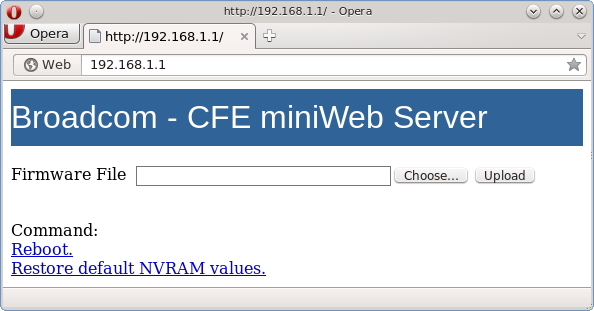
¶ Changing CFE defaults
Every bcm47xx CFE has a small NVRAM backup that is used to restore the main NVRAM when it gets deleted or corrupted. If you want to modify that backup NVRAM, see changing defaults page.
¶ bcm63xx CFE
bcm63xx CFE is totally different to bcm47xx. The NVRAM is different, with no settings stored outside the CFE partition, they are embedded into CFE. The CLI has different commands, probably with fewer options. And almost always there is a web server available for flashing. Fewer options but more fool-proof.
To access CFE you need to attach a serial console. To get a prompt just press any key while powering the device up.
This is a typical output when starting up the CFE and entering the CLI:
DGND3700 Boot Code V1.0.8
CFE version 1.0.37-104.4 for BCM96368 (32bit,SP,BE)
Build Date: Mon Feb 21 17:59:46 CST 2011 (finerain@moonlight)
Copyright (C) 2000-2009 Broadcom Corporation.

Parallel flash device: name AM29LV320MT, id 0x2201 size 32768KB
Total Flash size: 32768K with 256 sectors
ethsw: found bcm53115!
Chip ID: BCM6368B2, MIPS: 400MHz
Main Thread: TP0
Total Memory: 134217728 bytes (128MB)
Boot Address: 0xb8000000

Board IP address                  : 192.168.1.1:ffffff00
Host IP address                   : 192.168.1.2
Gateway IP address                :
Run from flash/host (f/h)         : f
Default host run file name        : vmlinux
Default host flash file name      : bcm963xx_fs_kernel
Boot delay (0-9 seconds)          : 1
Board Id (0-11)                   : 96368MVWG
Number of MAC Addresses (1-32)    : 10
Base MAC Address                  : 20:4e:7f:c0:b5:4c
PSI Size (1-64) KBytes            : 24
Enable Backup PSI [0|1]           : 0
System Log Size (0-256) KBytes    : 0
Main Thread Number [0|1]          : 0

*** Press any key to stop auto run (1 seconds) ***
Auto run second count down: 1
CFE>
CFE>
¶ Using CFE web (http) server
It's probably the most user friendly way of installing firmware. But sometimes some manufacturers decide to disable it (very uncommon).
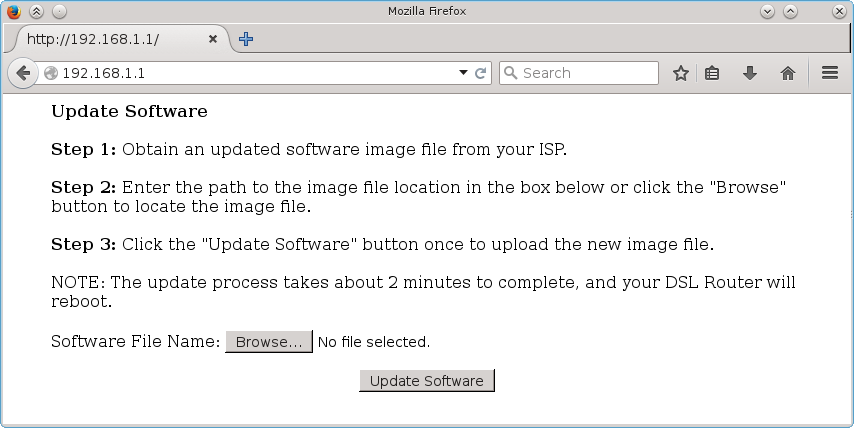
The default IP address of CFE is almost always 192.168.1.1. You should use a static IP in your PC since there isn't DHCP server available when running CFE.
For accessing this web interface:
- Unplug the power source
- <color crimson>Press</color> the RESET button at the router, don't release it yet!
- Plug the power source
- Wait some seconds
- <color green>Release</color> the RESET button
- Browse to
http://192.168.1.1 - Send the new firmware and wait some minutes until the firmware upgrade finish.
Note: The RESET button doesn't work in some routers. There are some alternatives to stop CFE before loading the current firmware when the RESET button didn't work:
- Attach a serial console (serial TTL cable adapter required). Press any key at the console when starting up the router. This is the better choice.
- Shortcircuit TX and RX serial pins some seconds when powering on the router to simulate keyboard buttons pressing; this is ugly but it should work.
- Delete existing firmware, if the current firmware allows to delete partitions.
- Or upgrade the router with a new fake firmware (filled with zeroes). This will force CFE to stop for requesting a new firmware.
- Download tftp by http://tftpd32.jounin.net and connect the ethernet and give static ip, default gateway usually 192.168.1.1 after that open tftp.exe by downloading and in the tftp client put the openwrt firmware then after some second click break, then in the browser keep on hitting default gateway by powering off and pressing reset while powering on, it goes on cfe.Worked for me.
¶ CFE Secure Boot
In modern SoC releases, Broadcom is integrating a Secure Boot system based in a chain of trust.
The following information is deduced from the sources available and therefore must be taken with caution.
Up to date, there are three generations of Secure Boot that embraces the following models:
- GEN1: 63268
- GEN2: 63138, 63148, 63381, 6838 and 6848
- GEN3: 63158, 4908, 6858, 6856, 6846, 6878, 63178 and 47622
¶ Mechanism
- The SoC has as factory settings, most probably in the OTP fuses, the private key unique per each model and also 2 keys AES CBC (ek & iv). This is the Root of Trust which is known by OEM.
- During boot, the PBL (Primary Boot Loader coded in the SoC) will search for storage peripherals e.g. NAND or NOR SPI. If found then loads a small portion from start of storage into memory. Exact amount may depend on model and storage but most typically 64kb. In the sources this chunk is called CFEROM.
- Once loaded the CFEROM, the PBL will analyse the structure, which is a compound of different chunks: valid header, magic numbers, signed credentials, CRC32, actual compiled code, etc. In the end, the PBL will decide if CFEROM meets the structure required and it is properly signed. If this is so, then the PBL will execute the compiled code encapsulated. Note that this code is usually not encrypted and therefore can be detected with naked eyes.
- Typically, CFEROM will start PLL's and full memory span. Most probably doesn't need to run a storage driver since it is already working. Then it will jump to CFERAM location as coded
- CFERAM binary is encoded in JFFS2 filesystem. It must meet a certain structure as CFEROM. The compiled code is usually LZMA compressed and AES CBC encrypted, rendering the resulting binary absolutely meaningless.
¶ Secure modes
Several modes can be chosen inside the CFEROM, putting appropiate headers:
- UNSECURE. The chain of trust is consciously dropped. The compiled code will be executed as trusted. This is potentially very interesting in order to develop other bootloaders like U-Boot
- SECURE. This sets the kind of encryption and keys used, which in turn can be:
<!-- -->
    * GEN2 = MFG
    * GEN3 = MFG or FLD
¶ CFEROM structure
The actual implementation differs depending on the generation and the storage media, but roughly this guidelines are true:
¶ GEN1
WIP
¶ GEN2
| Offset | Length | Chunk | Element | Value | Comments |
|---|---|---|---|---|---|
| 0x0 | 0x14 | Unauth header | |||
| 0x0 | 0x4 | ::: | Magic number 1 | 0x0001B669 | In decimal = 112233 |
| 0x4 | 0x4 | ::: | Magic number 2 | 0x0006CC7E | In decimal = 445566 |
| 0x8 | 0x4 | ::: | Version | 0x00000001 | |
| 0x0c | 0x4 | ::: | SBI_length | variable | Length in bytes of Unauth Header + SBI |
| 0x10 | 0x4 | ::: | JAM CRC32 | variable | JAM CRC32 of all the previous elements |
| 0x14 | variable | SBI | |||
| 0x14 | 0x2 | ::: | type | 0x00 | This seems a legacy field |
| 0x16 | 0x2 | ::: | ver | 0x00 | This seems a legacy field |
| 0x18 | 0x2 | ::: | len | 0x00 | This seems a legacy field |
| 0x1a | 0x2 | ::: | config | 0x00 | This seems a legacy field |
| 0x1c | 0x180 | ::: | mfg.oem.bin | variable | Actual structure has been reversed. |
| 0x19c | 0x100 | ::: | mfg.oem.sig | variable | SHA256 signature of mfg.oem.bin. Key must be in SoC |
| 0x29c | 0x180 | ::: | op.cot.bin | variable | Unknown meaning "OP" |
| 0x41c | 0x100 | ::: | op.cot.sig | variable | SHA256 signature of op.cot.bin. Key must be in SoC |
| 0x51c | variable | ::: | cferom.bin | variable | This is the actual machine code that will be executed |
| SBI_length-0x104 | 0x100 | ::: | SHA256 sig | variable | This is the SHA256 signature of all the previous SBI elements. Key is the one declared in mfg.oem.bin |
| SBI_length-0x4 | 0x4 | ::: | JAM CRC32 | variable | This is the JAM CRC32 of all the previous SBI elements except SHA256 sig. |
From the sources, we can reverse the structure of mfg.oem.bin:
| Offset | Length | Chunk | Element | Value | Comments |
|---|---|---|---|---|---|
| 0x0 | 0x148 | mfg.oem.bin | |||
| 0x0 | 0x6 | ::: | Signature header | 0x000000010242 | This seems like a magic word |
| 0x6 | 0x2 | ::: | Mid | 0x1234 | This value must match the SoC. We know for instance that bcm68380 has 0xffd0 |
| 0x8 | 0x100 | ::: | KrsaMfgPub.bin | variable | Modulus of the new public key that we want to use |
| 0x108 | 0x20 | ::: | mfg.ek.enc | This is an encrypted file of the new AES CBC key. The encryption key must be in SoC | |
| 0x128 | 0x20 | ::: | mfg.iv.enc | This is an encrypted file of the new AES CBC key. The encryption key must be in SoC |
¶ GEN3
WIP
=== In the search of the RoT password === If the PBL password was known, we could develop any bootloader with or without the CoT characteristic. It is most likely that this will never be exposed being Broadcom so obscure with their products.
However, we must remain attentive to the GPL bundles that pop up from time to time.
More precisely, in the following repo RoT lies a capital piece of information.
Basically the readme.txt file is saying that at least for GEN3:
The file Krot-mfg-encrypted.pem is aes-128-cbc encrypted with the same pass-phrase that encrypts the files bcm63xx_encr*.c located in the cfe/cfe/board/bcm63xx_btrm/src direcotry. After the file is decrypted, the pem file contains both the private and public portion of the RSA key Krot-mfg.
This means:
- The PBL MFG password is encrypted in the file Krot-mfg-encrypted.pem
- The password must be declared in the files bcm63xx_encr*.c, lying in /src
- Analysing the script make_new_target.sh, a possible name for this file is "bcm63xx_encr3_clr.c"
Therefore we must focus on finding "bcm63xx_encr3_clr.c" in order to support GEN3 CoT. We might think that there must be a file "bcm63xx_encr2_clr.c" for GEN2 and so on.
=== Sources ===
¶ Using CFE TFTP client
If you want to install a firmware using TFTP, follow these steps (as an alternative to the above install process).
- Connect a serial TTL cable to send commands to CFE via serial console software, for loading the firmware via TFTP.
- Start a TFTP server in your PC. Copy the firmware.bin file to the TFTP server's directory.
- Set the IP at your pc to 192.168.1.35 (or any compatible), and connect the ethernet cable to the router.
- Power ON the router, press any key in the serial console to break into the CFE command line interpreter.
- Execute the command:
f 192.168.1.35:firmware.bin
This is a session of flashing via TFTP:
CFE> f 192.168.1.35:firmware.bin
Loading 192.168.1.35:firmware.bin ...
Finished loading 2686980 bytes

Flashing root file system and kernel at 0xbfc10000: ..........................................

.
*** Image flash done *** !
Resetting board...\0xff
¶ CFE HEADER
At the begining of CFE, outside the NVRAM area there exist three interesting parameters:
| Offsets | parameter | possible values | size | |
|---|---|---|---|---|
| 0x010-0x013 | BpGetSdramSize | 8MB 1 CHIP 16MB 1 CHIP 32MB 1 CHIP 64MB 2 CHIP 32MB 2 CHIP 16MB 2 CHIP 64MB 1 CHIP |
0 1 2 3 4 5 6 |
4 bytes (unsigned long) |
| 0x014-0x017 | BpGetCMTThread (Main Thread) |
core0 core1 |
0 1 |
4 bytes (unsigned long) |
| 0x570 | CFE Version | any e.g. "cfe-v" | 5 | |
| 0x575 | CFE Version Number | any | 1.0.38-114.101 | 5 |
| 0x57A | unused | 6 |
¶ NVRAM
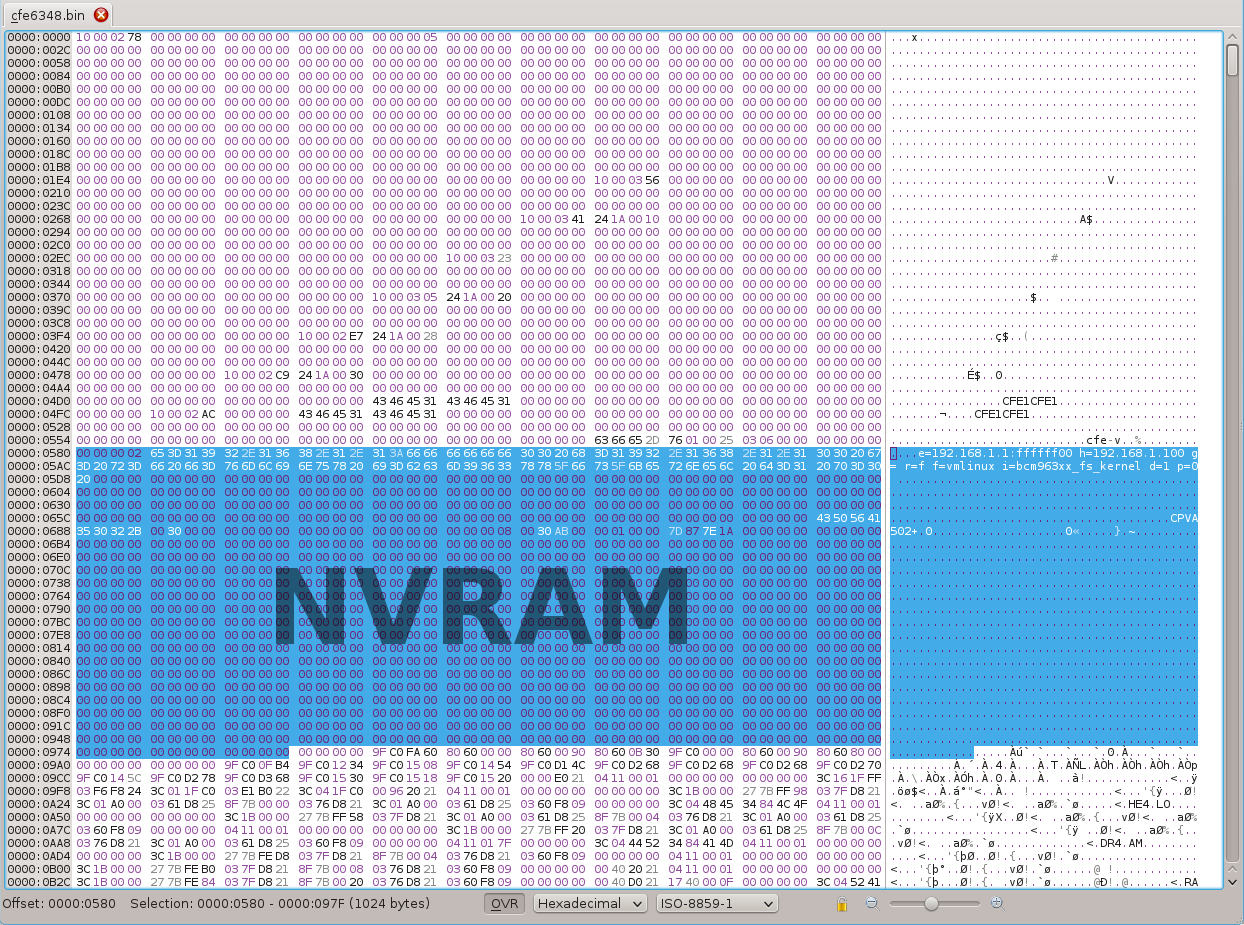
The NVRAM is located between offsets 0x580 to 0x97F. The size is 1KB (1024 bytes).
In this pic you can see the NVRAM highlighted:
| NVRAM version<5 (usually found in BCM6338, BCM6348, BCM6358) | |||
|---|---|---|---|
| Offsets | parameter | size | |
| 0x580 | NVRAM Version | 4 bytes | |
| 0x584 | BOOT LINE | e=192.168.1.1 (Board IP) h=192.168.1.100 (Host IP) g= (Gateway IP) r=f/h (run from flash/host) f=vmlinux (if r=h) i=bcm963xx_fs_kernel d=3 (delay, 0=forever prompt) p=0 (boot image, 0=latest, 1=previous) |
256 bytes |
| 0x684 | Board ID | 16 bytes | |
| 0x694 | reserved | 8 bytes | |
| 0x69C | Number MAC Addresses | 4 bytes | |
| 0x6A0 | Base MAC Address | 6 bytes | |
| 0x6A6 | reserved | 2 bytes | |
| 0x6A8 | CheckSum | 4 bytes | |
| 0x6AC | --- EMPTY --- | 724 bytes |
 |
Not all bcm63xx CFEs share this structure, some CFEs seem to have additional parameters like PsiSize, Country, SerialNumber, etc. As a result of this the CheckSum maybe located at different offsets and therefore the calculation is different. The EMPTY space isn't used to calculate the CheckSum |
| NVRAM version>=5 (usually found in BCM6328, BCM6362, BCM6368, BCM6816) | |||
|---|---|---|---|
| Offsets | parameter | size (bytes) | |
| 0x580 | NVRAM Version | 4 | |
| 0x584 | BOOT LINE | e=192.168.1.1 (Board IP) h=192.168.1.100 (Host IP) g= (Gateway IP) r=f/h (run from flash/host) f=vmlinux (if r=h) i=bcm963xx_fs_kernel d=3 (delay, 0=forever prompt) p=0 (boot image, 0=latest, 1=previous) |
256 |
| 0x684 | Board ID | e.g. "96328avng" | 16 |
| 0x694 | Main Thread | 4 | |
| 0x698 | Psi size | 4 | |
| 0x69C | Number MAC Addresses | 1-32 | 4 |
| 0x6A0 | Base MAC Address | 6 | |
| 0x6A6 | is default set flag | 1 | |
| 0x6A7 | allocate space for backup PSI flag | 1 | |
| 0x6A8 | old v4 CheckSum | 4 | |
| 0x6AC | gpon Serial Number | 13 | |
| 0x6B9 | gpon Password | 11 | |
| 0x6C4 | WPS Device Pin | 8 | |
| 0x6CC | WLAN Params | 256 | |
| 0x7CC | Syslog Size | 4 | |
| 0x7D0 | NAND Part Ofs Kb | 20 | |
| 0x7E4 | NAND Part Size Kb | 20 | |
| 0x7F8 | Voice Board ID | 16 | |
| 0x808 | AFE ID | Primary AFE ID + Bonding AFE ID (4+4) | 8 |
| 0x810 | OptoRxPower Reading | 2 | |
| 0x812 | OptoRxPower Offset | 2 | |
| 0x814 | OptoTxPower Reading | 2 | |
| 0x816 | unused | 58 | |
| 0x850 | Flash Block Size | 1 | |
| 0x851 | AuxFS Size Percentage | 1 | |
| 0x852 | unused | 169 | |
| 0x8FB | Reset to Default CFG Flag | 1 | |
| 0x8FC | Model Name | 32 | |
| 0x91C | DES Key | 32 | |
| 0x93C | WEP Key | 32 | |
| 0x95C | Serial Number | e.g. "684624H153031359" | 32 |
| 0x97C | CheckSum | 4 | |
| 0x980 | --end-- | Total: 1024 |
NVRAM versions >=5 always have the checksum placed at the end of the NVRAM.
¶ PSI
At the end of the flash outside the CFE, there exists a PSI partition (Profile Storage Information), about 16KB size. In Openwrt this area is protected with a partition called nvram. Do not confuse with the CFE NVRAM!!
There isn't any interaction between CFE and PSI except for restoring it to defaults or erasing this area. The settings present in this area are only used by the OEM firmware.
¶ Building CFE
This section describes how to build CFE from vendor-released open-source GPL code. This can be useful if the stock CFE is damaged, locked, or lacks certain features. We will take `AsusWRT RT-AX88U router GPL source code` as an example.
The following steps produce a CFE image that only works with SPI Flash. A NAND build needs a different configuration!
Has been tested on:
- Ubuntu 22.04.2 LTS in WSL2, amd64
- Debian 12 (Bookworm), amd64
¶ Setup dependencies
Building CFE usually relies on fairly odd toolchains that are no longer available on modern distributions. If you encounter any errors during the build process, try running this to fix some dynamic linked library locations:
sudo dpkg --add-architecture i386
sudo apt update
sudo apt install libmpc3:i386
sudo ln -sv /usr/lib/i386-linux-gnu/libmpc.so.3 /usr/lib/i386-linux-gnu/libmpc.so.2
sudo ln -sv /usr/lib/i386-linux-gnu/libmpfr.so.6 /usr/lib/i386-linux-gnu/libmpfr.so.4
¶ Setup GCC
To compile CFE, a cross-compiling GCC toolchain must be made available to the CFE build system via the environmental variable `TOOLCHAIN_BASE`.
If you already have an OpenWrt local build environment, run export TOOLCHAIN_BASE=/PATH_TO_OPENWRT_ROOT/staging_dir/toolchain-mips_mips32_gcc-13.3.0_musl.
Or you can use the pre-compiled toolchain:
curl -L https://downloads.openwrt.org/releases/24.10.4/targets/bmips/bcm63268/openwrt-toolchain-24.10.4-bmips-bcm63268_gcc-13.3.0_musl.Linux-x86_64.tar.zst | tar --zstd -xvf - -C /tmp
export TOOLCHAIN_BASE=/tmp/openwrt-toolchain-24.10.4-bmips-bcm63268_gcc-13.3.0_musl.Linux-x86_64/toolchain-mips_mips32_gcc-13.3.0_musl/
¶ Obtain Source Code
Get the CFE source code from the AsusWRT RT-AX88U router GPL source code so that we stay legal.
git clone https://github.com/blackfuel/asuswrt-rt-ax88u.git
cd asuswrt-rt-ax88u
# This is the known-to-work commit. Try the latest if you want.
git checkout 481642dfe5fa62cc2ccf2b9e656396395181ac58
¶ Patch the Source Code
so that it compiles under GCC 13.3.0. Save the following text as file cfe_gcc_13.patch.
diff --git a/release/src-rt-5.02axhnd/cfe/cfe/arch/mips/common/src/tools.mk b/release/src-rt-5.02axhnd/cfe/cfe/arch/mips/common/src/tools.mk index d2413d4a3..1104f78a4 100644 --- a/release/src-rt-5.02axhnd/cfe/cfe/arch/mips/common/src/tools.mk +++ b/release/src-rt-5.02axhnd/cfe/cfe/arch/mips/common/src/tools.mk @@ -4,6 +4,7 @@ CFLAGS += -g -c -ffreestanding CFLAGS += -Wall -Werror -Wstrict-prototypes -Wmissing-prototypes +CFLAGS += -fcommon ifeq ($(strip ${CFG_RAMAPP}),1) CFLAGS += -O0 else @@ -22,8 +23,8 @@ ifeq ($(strip ${CFG_LITTLE}),1) TOOLS :=$(TOOLCHAIN_BASE)/crosstools-mipsel-gcc-5.3-linux-4.1-uclibc-1.0.12-binutils-2.25-NPTL/usr/bin/ TOOLPREFIX :=mipsel-buildroot-linux-uclibc- else - TOOLS :=$(TOOLCHAIN_BASE)/crosstools-mips-gcc-5.3-linux-4.1-uclibc-1.0.12-binutils-2.25-NPTL/usr/bin/ - TOOLPREFIX :=mips-buildroot-linux-uclibc- + TOOLS :=$(TOOLCHAIN_BASE)/bin/ + TOOLPREFIX :=mips-openwrt-linux- endif diff --git a/release/src-rt-5.02axhnd/cfe/cfe/board/bcm63xx_ram/src/bcm63xx_util.c b/release/src-rt-5.02axhnd/cfe/cfe/board/bcm63xx_ram/src/bcm63xx_util.c index d0e6d6f04..2fde0c899 100644 --- a/release/src-rt-5.02axhnd/cfe/cfe/board/bcm63xx_ram/src/bcm63xx_util.c +++ b/release/src-rt-5.02axhnd/cfe/cfe/board/bcm63xx_ram/src/bcm63xx_util.c @@ -2445,7 +2445,9 @@ int processPrompt(PPARAMETER_SETTING promptPtr, int promptCt) if (strlen((promptPtr+i)->parameter) > 0) printf("%s %s ", (promptPtr+i)->promptName, (promptPtr+i)->parameter); else + { printf("%s %s", (promptPtr+i)->promptName, (promptPtr+i)->parameter); + } memset(tmpBuf, 0, MAX_PROMPT_LEN); console_readline ("", tmpBuf, (promptPtr+i)->maxValueLength + 1); diff --git a/release/src-rt-5.02axhnd/cfe/cfe/net/net_tftp.c b/release/src-rt-5.02axhnd/cfe/cfe/net/net_tftp.c index cdd6f5006..0f3999ff6 100644 --- a/release/src-rt-5.02axhnd/cfe/cfe/net/net_tftp.c +++ b/release/src-rt-5.02axhnd/cfe/cfe/net/net_tftp.c @@ -1148,6 +1148,7 @@ static void tftp_fileop_uninit(void *fsctx) } #if 1 +int send_rescueack(unsigned short no, unsigned short lo); extern int send_rescueack(unsigned short no, unsigned short lo) { ebuf_t *buf = NULL;
then apply it with:
git apply cfe_gcc_13.patch
¶ Compile CFE
# Start compiling
cd release/src-rt-5.02axhnd/cfe/build/broadcom/bcm63xx_rom

# Clear all leftover binaries from previous compilation
make clean
rm -v \
../bcm63xx_ram/*.o ./*.o \
../bcm63xx_ram/cfe63268* ./cfe63268* \
../bcm63xx_ram/libcfe.a ./libcfe.a \
flashimg.S

# Build CFE
make BRCM_CHIP=63268
The produced CFE binary is `cfe63268.bin`, and now you can write it to the beginning of the SPI flash.
Note:
- This CFE binary expects the BCM tag version to be 7. OpenWrt's
imagetagtool will use 6 by default. Usually needsCFE_EXTRAS += --tag-version=7in the OpenWrt build script (target/linux/bmips/image/xxx.mk) to override. - The size of the CFE binary is around 78kB, but it claims a size of
0x30000bytes in the source. We'd better respect this! - The firmware image starts at
0x30000in the SPI flash. - Add
BLD_NAND=1to the build command line to build for NAND-based system.