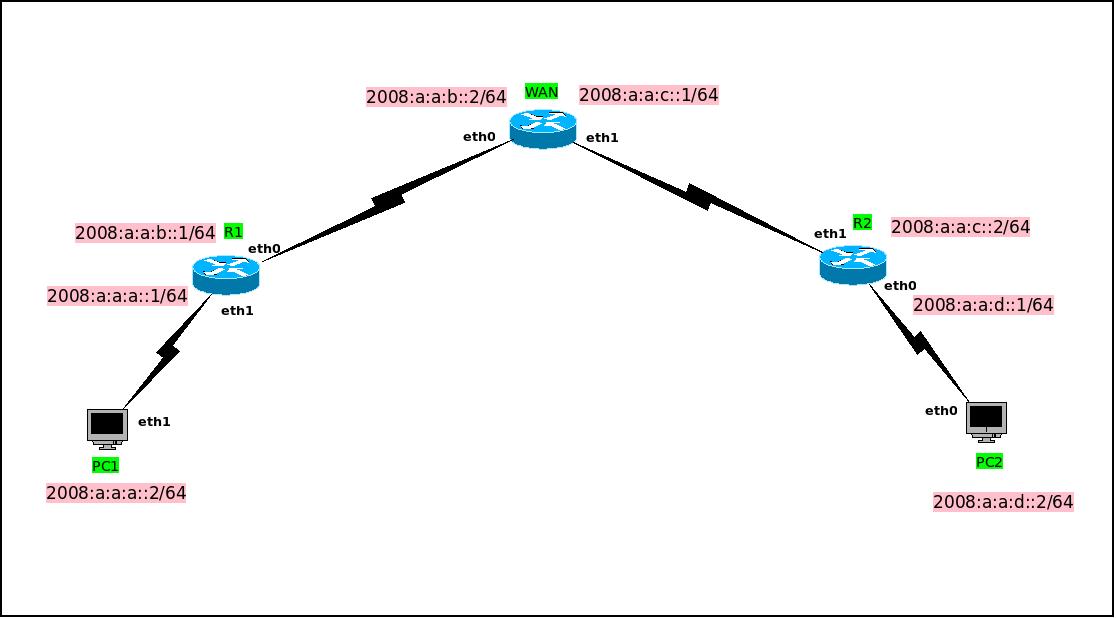
For creating a basic network configuration in IPv6 like it shows in the picture.
In this example, we will use 3 routers and 2 client PCs.
# /etc/config/network

config interface 'lan'
    option device 'eth1'
    option proto 'static'
    option ip6addr '2008:a:a:a::1/64'

config interface 'wan'
    option device 'eth0'
    option proto 'static'
    option ip6addr '2008:a:a:b::1/64'
    option gateway '2008:a:a:b::2'
# /etc/config/network

config interface 'lan'
    option device 'eth0'
    option proto 'static'
    option ip6addr '2008:a:a:d::1/64'

config interface 'wan'
    option device 'eth1'
    option proto 'static'
    option ip6addr '2008:a:a:c::2/64'
    option gateway '2008:a:a:c::1'
# /etc/config/network

config interface 'lan1'
    option device 'eth0'
    option proto 'static'
    option ip6addr '2008:a:a:b::2/64'

config interface 'lan2'
    option device 'eth1'
    option proto 'static'
    option ip6addr '2008:a:a:c::1/64'

config route6 'net1'
    option interface 'lan1'
    option target '2008:a:a:a::/64'
    option gateway '2008:a:a:b::1'

config route6 'net2'
    option interface 'lan2'
    option target '2008:a:a:d::/64'
    option gateway '2008:a:a:c::2'
For the PCs configuration, we just set up the IP addresses in each station.
# PC1
address 2008:a:a:a::2/64
gateway 2008:a:a:a::1

# PC2
address 2008:a:a:d::2/64
gateway 2008:a:a:d::1